 Documentation method
From crawlspace photos to crawlspace intelligence.
Crawlspace Blueprints™ give the registry its structure. Two visual modes — 2D and 360° — share one zone naming convention, one severity model, and one record. The method is the moat.
$499 official capture visit
Read it at a glance. Walk it in 360°.
Each mode answers a different question — but every finding lives once, linked across both. A pin on the 2D plan resolves to a hotspot in the 360° pano.
Crawlspace Blueprint™
An overhead map of the crawlspace — zones, access points, mechanical runs, and pinned findings. The fastest way to read the space at a glance.
360° Space-Crawler™
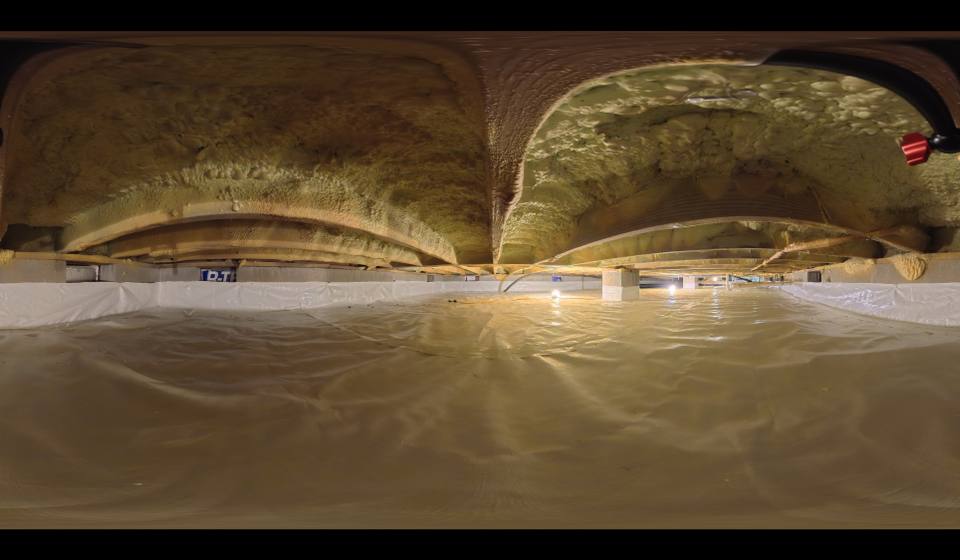
Immersive 360° captures linked to zones. Walk the crawlspace from a browser — the homeowner sees the space without entering it.
What happens during a Crawlspace Blueprints™ visit.
Crawl-Space Connect performs the documentation event. Our authorized documentation and editor team enters the crawlspace, operates the proprietary recording technology, and publishes v1.0 of the Blueprint to the property record. Homeowners do not crawl. Homeowners do not upload photos and call it a Blueprint. The Blueprint is captured by us, structured by the registry, and owned by the property.
01 · Zones
We map the crawlspace into Z-01 through Z-06 (or more, depending on footprint). Every zone gets a canonical name that holds across visits, contractors, and years.
02 · 2D plan view
The overhead map of the space. Access points, mechanical runs, pier locations, and pinned findings on a flat baseline. The fastest way to read the crawlspace at a glance.
03 · 360° Space-Crawler™ capture
Immersive pano captures anchored to each zone. The homeowner sees the space without entering it. Trade partners pre-visit the space from a browser.
04 · Condition readings
Relative humidity, wood moisture content, and other condition readings recorded at the visit and pinned to zones. Readings stack over time on the maintenance timeline.
05 · Pinned findings
Conditions documented, photographed, and pinned to the 2D plan and the 360° Space-Crawler™ pano simultaneously. One finding, two views. Severity-coded on the five-level ladder.
Crawl-Space Connect performs documentation field work. Crawl-Space Connect does not perform correction, repair, or remediation work — that's the verified trade partners.
Why crawlspace photos aren't enough.
Loose photos don't carry location, severity, or chain of evidence. Crawlspace Blueprints™ tie every image to a place, a zone, a date, and a contributor.
Location-anchored
Every photo, reading, and finding pins to a zone. Z-03 means the same thing across visits, contractors, and years.
Severity-coded
Monitor · Service · Priority · Safety · Review. Every finding carries a level — and the level determines the route.
Versioned
Each Blueprint update is a new version, not an overwrite. The trend is the story — drainage installs, RH over time, access changes.
Time-aware
Every reading and finding carries a date. Quarterly RH logs, annual capture visits, and post-correction re-reads all live on a single timeline.
Cross-mode linked
A finding on the 2D plan resolves to a hotspot in the 360° pano. One record, two views.
Canon-linked specs
Drainage sections, RH targets, access notes — specs reference the Crawl-Space Connect registry canon, versioned and not negotiated per visit. Target RH 48–55%.
Severity ladderFive levels. One route per level.
Every finding sits on a five-step severity ladder. The level determines how the registry routes it, who can act on it, and whether it holds for admin review.
Request the documentation eventA Crawlspace Blueprint™ is how a record begins.
Schedule a Crawlspace Blueprint™ visit to create the visual baseline. Once it's documented, the registry takes over — and the record grows from there.